The Big Deal between RGB and CMYK Within the AM.CO.ZA InkRIP Software (Part 2)

inkrip rgb cmyk difference
When printing files from a digital space to a physical one, understanding color modes are way more necessary than you might think.
Understanding the difference between RGB and CMYK will give you a closer printed result to what you see on the original digital design file.
This video is part of a Mini-Series.
The next video covers Size & DPI.
The previous video covered Raster vs Vector.
Video Transcript
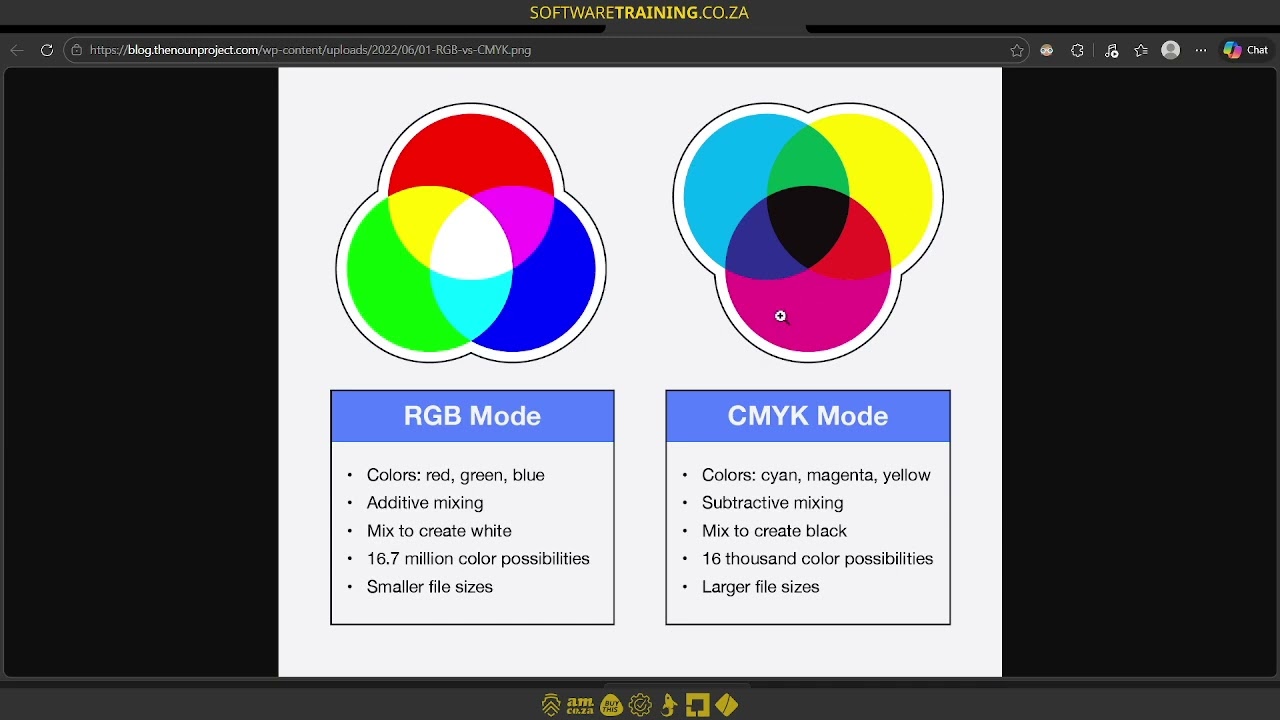
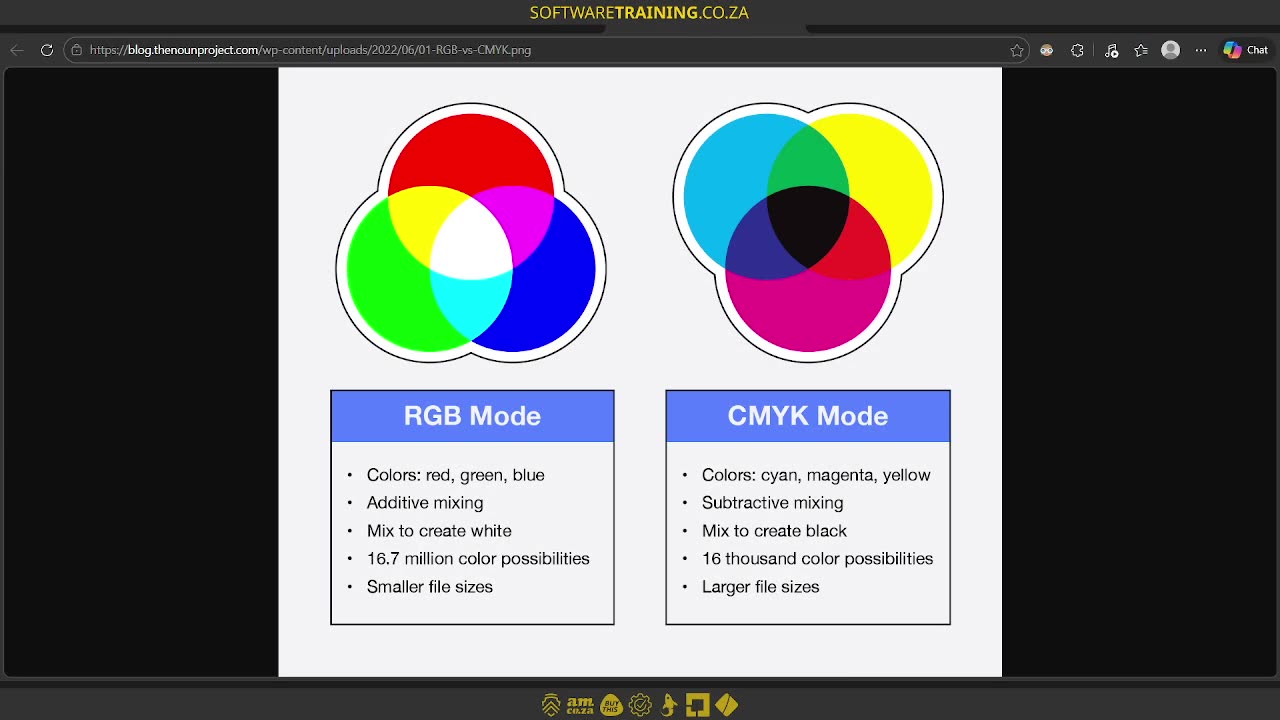
Howdy guys. In today's video, we're gonna be looking at RGB versus CMYK. But before that, let's have a quick intro first. So, today's video can be found on softwaretraining.co.za. We make short and easy to watch problem solving videos, and we also have daily updates. Now, when it comes to actual RGB versus CMYK there's a few things that's important to note. I like to sometimes view this as the RGB is kind of like a digital version of colour. Then the CMYK is a more traditional paint version. So the one uses light, so the RGB and it's got the red light, green light, and blue light, where the actual paint, you're gonna be using cyan, magenta, and yellow. Now, as you mix these ones, you're gonna get different colours. So, um, yeah, so these ones, like I said, once you combine some of these lights. Uh, it will change and that's also. An additive form. So what it comes down to is, when you add things, it will change and then also it will create a form of white when you add all of them. Where when it comes to CMYK, this is more subtractive mixing. So, you will remove from colours, but also when you add. It will eventually create a form of key. Now, some places, yes, they have a black paint as well, but in general, this is how those two formulas or formats work. Now, when it comes to, how can I say the, the trick, and that's where rip software comes in like encrypt, it is how do we take our RGB colour values and translate it in a way that the paint gets printed in a similar value. Cause something to keep in mind with the light. Your colours can be way more vibrant, way more alive, where CMYK can often be very dull. So there are ways you can go around making ICC profiles or custom ones where it has specific colours, maybe you use it a lot for like a brand or something. And that one will be more vibrant, but in general, you'll find your CMYK tends to be a little bit more dull just because of the nature of the paint and so forth. So, what I would recommend is if you're gonna be designing something for print, start your design CMYK. Yes, you can convert it, but it tends to not have exactly the same results what you were looking for. Now, there's also ways obviously, you can calibrate your screen versus your print and so forth, and uh but it's a very deep topic that, which we're not gonna go into. Another thing, it's worthwhile to note on the RGB versus CMYK, so the RGB as you can see here, you can create 6.7, I mean, 16.7 million colour possibilities. So, I mean, you know, you really like get quite spoiled with the amount of colour possibilities you have and because also it is digital. You know, the, the hex code and so forth is very simple. Now, you do get similar ones for the actual CMYK, but it's gonna differ depending on the material you're printing on and the software you're using and so forth, and the actual printer itself. And as you can see here, this one only has 16,000 colour possibilities. I mean, it's not a lot, but uh compared to the RGB it's definitely not as much. Now, just the bonus one, you can see obviously file size, the RGB one is way smaller versus actual print files. That's why you'll see when you finally convert something from RGB or image to a CMYK the print file will go way larger. Um, to compensate. But yeah, so that's pretty much it on RGB for the CMY1K. Like I said, I like to view it as digital and traditional, and then just keep in mind, if you're gonna be working uh from, uh I should I say, if you're gonna be making a design for print, I would recommend from the start with the CYK you can convert it, but um this will stay more true to the colour while you're working. But yeah, otherwise, if we head here to softwaretraining.co.za. You guys will notice we've got a variety of different softwares we do cover, and you can also isolate your search on the top right. If you do not, however, find the training videos you're looking for, just simply go here on the left, request the training video, and then we'll do our best to try and make that for you. But otherwise, thanks guys for watching and cheers.